May is when the smart thermostat questions start arriving in waves. The first cooling-on day of spring drives a flurry of “my old thermostat just clicks but the air conditioner does nothing” calls, and once the diagnostic is done the conversation almost always pivots to the same question — “while you’re here, should I just put a Nest or Ecobee in?” The honest answer for most GTA homes is yes, but the honest install conversation is more interesting than the marketing copy. Below is what we wish more homeowners knew before they pulled the trigger on a smart thermostat retrofit in spring 2026.
When a smart thermostat actually pays back in the GTA
The marketing claim is “save 10–20 percent on heating and cooling.” Independent field studies put the realistic GTA-shaped number closer to 8–12 percent on a forced-air natural-gas furnace plus central air system, with most of the savings coming from cooling setbacks during the workday and overnight, not from the heating side. On an average GTA home with a $1,800–$2,400 combined gas-and-electric annual HVAC spend, that is roughly $150–$280 a year. A $250–$400 installed smart thermostat pays back in 18–30 months, ignoring rebates.
Where the payback math breaks down is on (a) homes that already kept tight programmable schedules — there is much less to recover — and (b) homes with hot-water boilers or radiant heat where setback strategies are less effective because the system has so much thermal lag. On those systems the value of a smart thermostat is comfort, occupancy detection, and remote control, not gas savings. We tell hot-water-boiler clients to manage their expectations on the gas-bill line.
The other shape of payback worth naming: integration with a heat pump or dual-fuel system. If your home is on a cold-climate heat pump or running heat-pump-plus-gas-furnace as a hybrid (covered in our Ontario HVAC 2026: Gas Furnace vs. Cold-Climate Heat Pump vs. Hybrid System deep dive), the right smart thermostat is not optional — it is the brain that decides which heat source runs in any given hour, and a wrong choice will cost you in efficiency over the season.
The C-wire reality — the single biggest gotcha
The single most common spring 2026 install surprise is the C-wire question, and the marketing on every box has gotten softer about it without changing the underlying physics.
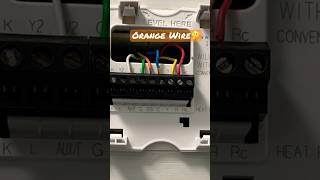
Older furnace and air-handler installs in the GTA — anything pre-2010, broadly — were wired with two wires (R and W for heat-only, or four wires for heat-and-cool: R, W, Y, G). The “C” wire is a dedicated 24-volt common return that lets a smart thermostat draw continuous power for its display, Wi-Fi radio, occupancy sensors, and processor. Without it, the thermostat has to “steal” power by partially closing the heat or cool circuit, and on certain systems that produces ghost calls, short cycling, or a thermostat that simply will not stay on.
Where the marketing is technically correct: the Nest Learning Thermostat 4th gen and the Nest Thermostat are designed to work without a C-wire on most 24V systems, with Nest stating that fewer than one percent of installs require a C-wire or Nest Power Connector. The Ecobee Premium and Enhanced both ship with a Power Extender Kit (PEK) that effectively creates a C-wire by sharing the existing wires through a switch at the furnace, so they too can be installed on most pre-C-wire systems.
Where the marketing skips a step: PEK installations require access to your furnace control board — basement, mechanical room, attic, wherever it lives — and a non-trivial wiring step that is not the simple “five-minute swap” the box advertises. On older Lennox and Carrier control boards in particular, the PEK terminal labelling does not always match the diagram, and a wiring mistake will fry either the PEK or the control board’s 3-amp fuse. We have replaced more $4 fuses for spring DIYers than we can count, and the fuse replacement is cheap; the diagnostic call to figure out which fuse and where is not.
The clean install is to run a real C-wire. On a standard GTA two-storey with the furnace in the basement and the thermostat on the main floor, an electrician or HVAC tech can usually fish a new 18/5 thermostat cable in 60–90 minutes for $200–$350. If your existing thermostat cable is 18/5 or 18/8 (count the wires at the furnace, not the wall — the wall side may have unused wires capped off behind the plate), you may already have a C-wire in place; it just needs to be terminated at both ends. That is a $100–$150 add to a thermostat install with no fishing required.
If you are installing during a kitchen, basement, or main-floor renovation, run the cable while the walls are open. Even if you are not buying a smart thermostat this year, a 5-conductor or 8-conductor thermostat cable is $30 in materials and saves you the entire access conversation later.
Nest vs Ecobee vs Honeywell vs Sensi — which fits which install
The four-brand short list we recommend in the GTA in spring 2026:
The Nest Learning Thermostat 4th gen ($339 CAD MSRP, frequently on sale at $279–$299) is the right pick for most single-zone forced-air natural-gas-plus-central-AC installs. It has the best display, the best learning algorithm of the four, and the strongest no-C-wire compatibility story. Where it falls short: integration with non-Google smart-home ecosystems is intentionally weaker than Ecobee’s, and the Learning model has never supported Apple Home directly (the simpler Nest Thermostat does, via a third-party Matter bridge).
The Ecobee Smart Thermostat Premium ($349 CAD MSRP, often $279–$299) is the right pick for any of: heat pump or dual-fuel system, multi-zone homes that want room sensors to weight comfort by occupancy, Apple Home or Alexa-first households, and anyone who wants a built-in air quality monitor (PM2.5, VOC, humidity). The Premium handles 2H/2C heat pump + 2-stage AUX heat configurations cleanly, which matters on the cold-climate heat-pump installs we are doing more of every year. The included PEK gives most pre-C-wire homes a clean retrofit path. The downside is the interface is not as polished as Nest’s and the Eco+ optimization can override your settings in ways some homeowners find annoying until they tune it down.
The Ecobee Smart Thermostat Enhanced ($219 CAD MSRP) is the value pick for the same Ecobee feature set without the air quality monitor. For most GTA single-zone installs, the Enhanced is plenty; the Premium is worth the upgrade only if room-sensor-driven comfort or air quality monitoring matters to you.
The Honeywell Home T9 ($229 CAD) is the pick for anyone who wants room sensors but does not want to be inside the Google or Amazon ecosystems. Solid product, slightly less aggressive learning algorithm than Nest or Ecobee. We see it most often in homes that already have a Honeywell zoning panel.
The Emerson Sensi Touch 2 ($169 CAD) is the budget pick. No-frills smart thermostat that supports basic schedules, geofencing, and remote control. Works well, looks utilitarian, no learning. For a rental or a secondary suite where you want remote control without the price of a Nest, it is the right answer.
What we will not recommend in spring 2026: any “smart thermostat” sold for under $80 on a marketplace site. The control loop on most of these is not properly tuned for North American HVAC (overshoots on calls, slow to detect satisfied set points, ghost cycling), and the cloud service for the Wi-Fi side has a bad track record of getting bricked when the manufacturer goes out of business. The four brands above all have at least three years of firmware support track record.
Real GTA spring 2026 install costs
Hardware plus professional install, all in, for a clean retrofit on a system that already has a C-wire:
A Nest Learning 4th gen install runs $400–$550 supplied and installed (thermostat $279–$339, install $100–$200). An Ecobee Premium install runs $400–$580 (thermostat $279–$349, install $100–$200). The labour band assumes a no-fish, terminate-only install. The high end accounts for furnace-side termination if the original cable was buried at the furnace plenum without a service loop.
If C-wire fishing is required, add $200–$350 for a standard two-storey with the furnace in the basement and the thermostat on the main-floor exterior wall. Add $400–$600 if the run is across multiple floors or through finished spaces with no easy chase. On homes with knob-and-tube remnants or mid-century plaster walls, factor in the possibility that the cleanest path is exterior conduit or a different thermostat location entirely; we have done a few “moved the thermostat to the hallway because the original location was unfishable” jobs.
If you go DIY: the thermostat itself costs the same. Add 90–120 minutes of your own time, a stud finder, a wire stripper, a small level, and the realistic possibility that the first hour will be spent identifying which wire at the furnace control board is which. The ENERGY STAR website and each manufacturer’s compatibility checker will save you from the hard miscompatibility cases (proprietary 4-wire heat-pump-only systems on a few mid-2000s Carrier installs, for example).
The DIY install we caution against: anything where the existing thermostat is also the system’s only line-voltage disconnect. On baseboard electric heat in older condos and apartments — common in 1970s East York, North York, and Etobicoke buildings — the wall thermostat is on a 240V line-voltage circuit, NOT a 24V low-voltage control loop. None of the smart thermostats discussed above will work on a 240V line-voltage loop without a relay box. Mysa, Sinopé, and a few other line-voltage-specific brands exist for that case. If your existing thermostat says “240V” anywhere on it or has only two thick wires entering the back, stop and check before you buy.
The Enbridge / Save on Energy rebate landscape
The single most-overlooked piece of the spring 2026 install math is the $75 instant rebate available through the Home Renovation Savings (HRS) program — a joint Enbridge Gas + Save on Energy program that replaced the older standalone Enbridge Smart Thermostat rebate in early 2025.
The mechanics that matter:
You can claim either an instant $75 discount code at Home Depot, Best Buy, the Google Store, Copeland Sensi, or ecobee.com — visit homerenovationsavings.ca, click “Get code,” receive an emailed personalized code in 1–2 minutes — or you can buy first and claim a $75 mail-in rebate within 60 days.
Eligibility: Ontario resident, Enbridge Gas customer with a primary natural gas furnace or boiler, OR connected to the Ontario electricity grid with electric heating or cooling. Either side qualifies. You cannot have previously received a smart thermostat rebate from Enbridge, Save on Energy, or HRS (one rebate per household per program lifetime, in practice).
The thermostat must be ENERGY STAR certified. Every Nest, Ecobee, Honeywell T9, and Emerson Sensi we recommend is on the qualified list. The list is updated quarterly on the HRS site.
You cannot stack the HRS thermostat rebate with the (now-closed) federal Greener Homes Grant, but you can stack it with the broader Home Efficiency Rebate Plus (HER+) if you are doing other envelope or HVAC work as part of a planned renovation. For more on stacking the full rebate landscape this year, our Ontario Home Renovation Grants and Rebates in 2026 post walks through everything currently claimable, and the Ontario Energy Audit 2026 write-up covers the audit-required programs.
The rebate effectively brings a $279 Ecobee Enhanced down to $204 supplied — meaningfully cheaper than a basic programmable Honeywell installed by an HVAC tech.
Heat-pump and dual-fuel compatibility
This is where the install gets interesting and where the wrong thermostat costs you for years.
A heat pump install needs a thermostat that understands the difference between heating, auxiliary heating, and emergency heating, and can call them independently with appropriate lockouts. On a cold-climate ducted system pairing a heat pump with a backup electric resistance strip or a backup gas furnace (the dual-fuel case), the thermostat has to manage a balance point — the outdoor temperature below which the backup heat source is more economical to run than the heat pump. Set it wrong and you either waste electricity calling the heat pump in -25°C weather it cannot efficiently service, or you waste gas calling the furnace at 0°C when the heat pump would have been cheaper.
Ecobee Premium and Enhanced both handle dual-fuel cleanly with O/B reversing valve control plus a configurable balance point in the installation menu. The default Ecobee balance point is around -5°C, which is not where most cold-climate heat pumps in the GTA actually break even — the right setting depends on the specific heat pump’s COP curve, your gas price, and your electricity price. We typically configure it at -7°C to -10°C for the cold-climate Mitsubishi and Daikin units we install, and we recommend re-evaluating after the first heating season once you have actual run-time data from the Ecobee app.
The Nest Learning 4th gen handles heat pumps and dual-fuel via its O/B and AUX configuration, but the balance-point tuning is more opaque than Ecobee’s — Nest decides when to switch based on its learning algorithm rather than letting the homeowner set a hard temperature threshold. For most owners that is fine; for owners who want to be sure the system is running on gas during a cold snap, the Ecobee gives you more direct control.
If you are running a ductless mini-split as your primary heating in any zone, the smart thermostat conversation is different — most ductless heads come with their own controller, and the GTA-spring-2026 multi-zone sizing math we walk through in GTA Ductless Mini-Split Spring 2026 is the right starting point before you start thinking about smart-thermostat overlay.
What a clean install actually looks like
The standard order of operations on a GTA retrofit:
Power off at the breaker. Not just at the thermostat — at the furnace breaker. The 24V control circuit is fed off the furnace transformer and the 24V control board can still energize parts of the wall thermostat circuit even with the thermostat in the off position. Confirm with a non-contact voltage tester at the wall.
Photograph the existing wiring. Both at the wall (which colour goes to which terminal letter — R, W, Y, G, C, O/B for heat pump, etc.) and at the furnace control board. The colour-to-terminal mapping is a homeowner standard but not a universal one; some installs ran cable with non-standard colour conventions. The photo is the rollback if anything goes wrong.
Verify or install the C-wire. Either confirm the existing terminal-letter mapping includes a C, install the manufacturer’s PEK at the furnace and re-terminate, or fish a new 18/5 cable.
Mount the thermostat backplate level. Use the level on the back of the new thermostat — not your own visual judgment, the rooms in older GTA homes are out of square enough that a “looks straight” thermostat usually is not.
Terminate one wire at a time at the new thermostat, matching the photo. Push the wires straight in (do not kink); on the Nest in particular, kinks under the spring connectors cause intermittent ghost connections.
Snap the thermostat onto the backplate. Power on at the breaker. The thermostat boots, walks through Wi-Fi setup, connects to your home network, and the manufacturer’s compatibility detection runs.
Run a heat call and a cool call from the thermostat in turn. Confirm the furnace fires for heat, the air handler runs for cooling, and the fan responds independently if you have a separate G call. Time the cycles — a 5-minute minimum cycle length is standard; if you see short cycling under 3 minutes, something is wrong.
Configure the schedule. The Nest will offer to learn from manual adjustments over the first week; the Ecobee will offer a setup-time schedule wizard. Either works. The savings come from the schedule, not from the brand.
Register the rebate. If you used the instant code at the retailer, this is done. If you bought first, file the mail-in within 60 days at homerenovationsavings.ca with a copy of the receipt and the model number.
Common spring 2026 install mistakes
Three patterns we see often enough to be worth naming:
The first is the wrong thermostat for the system. A homeowner with a heat pump installs a Nest Thermostat (the basic, not the Learning) without realizing it does not support 2-stage heat pump configurations. The system runs but the AUX heat will not come on when needed, leading to comfort complaints and a difficult-to-diagnose failure mode. Always run the manufacturer’s compatibility checker before buying.
The second is the location problem. A thermostat on an exterior wall in direct afternoon sun, behind a closed door, or above a heat register will report a temperature that does not represent the home. Smart thermostats with remote sensors (Ecobee, Honeywell T9) solve this with sensor placement; non-sensor thermostats (Nest Learning, Sensi Touch 2) are stuck with the wall location. If your existing thermostat is in a bad spot, this is the year to move it as part of the install.
The third is the Wi-Fi problem. Smart thermostats need a stable 2.4 GHz Wi-Fi signal at the install location. Older GTA homes with mesh systems often have a coverage hole at the central hallway where the thermostat lives. Test signal strength before install — a thermostat that randomly disconnects every few hours will lose your schedule, brick its remote control, and generate alerts you will eventually mute.
Bottom line
For most GTA homes in spring 2026, the right smart thermostat install is an Ecobee Enhanced or Premium for heat-pump and dual-fuel systems, a Nest Learning 4th gen for standard forced-air gas-plus-central-AC, and a Sensi Touch 2 for budget rentals or secondary suites. Real install cost runs $400–$580 supplied and installed if you have a C-wire, $600–$900 if you need one fished. The HRS rebate brings $75 off any ENERGY STAR model — claim it instantly at the retailer or within 60 days post-purchase.
The wrong thermostat for the system is the expensive mistake. The right thermostat for the wrong location is the slow-burn mistake. Both are worth a 30-minute pre-install conversation with your HVAC tech if you are not sure.
If you have done a smart thermostat retrofit on a GTA home recently and want to share the install — particularly the C-wire fishing path, the rebate experience, or the heat-pump configuration menu — drop a reply below. Track $RENO earnings on this topic — top contributors at the GTA-homeowner-and-trades intersection are tier-up candidates. Helpful posts (especially with photos of the existing furnace control board, the new thermostat backplate, and the Wi-Fi signal-strength reading at the install location) earn $RENO. Link a Solana wallet on signup so you can claim your earnings when on-chain settlement opens — full mechanics in Welcome to $RENO — Quests, Rewards, Leaderboard.
More from home.renovation.reviews
- Related guide: GTA Ductless Mini-Split Spring 2026 — Cold-Climate Models, Multi-Zone
- Renovation help: LF Builders — GTA Home Renovation Since 1973
- Community read: Samm Simon — Running 251 km for cancer research
- Blog: Comprehensive Home Renovation Trends 2024